
Documentation Index

Fetch the complete documentation index at: https://docs.loopscale.com/llms.txt

Use this file to discover all available pages before exploring further.

Loopscale Vaults provide a simple, passive way to earn lending yield. Each Vault has a single loan asset and can deploy capital across multiple Loopscale Markets. Risk exposure is actively managed through automated controls and strategy-specific parameters, so users don’t need to manage individual lending positions themselves. Depositors retain full control over their assets—they can view the Vault’s current activity at any time and withdraw liquidity at their convenience. Each Vault is overseen by a Curator, an individual or team responsible for optimizing the strategy and risk-return profile of a Vault. Curators decide eligible collateral, rates and terms, and how capital is allocated. Their expertise plays a critical role in Vault performance. Vaults are designed for users who want to earn yield without actively monitoring or managing loans.

How Loopcale Vaults Work

You can access Loopscale Vaults at the top of the Lend page in the Loopscale App. When you deposit into a Vault:
  1. Your funds are pooled with other depositors.
  2. The Vault Curator allocates this capital to selected overcollateralized borrowing markets on Loopscale at curator-set terms.
  3. Interest is paid by borrowers and distributed proportionally to all Vault depositors.
The curator can also enable Optimized Liquidity, meaning idle funds waiting to be matched to borrowers is deployed to external variable-rate protocols (e.g. MarginFi). Withdrawals: Curators can programmatically maintain a liquidity buffer, a portion of idle capital kept in reserve. If a liquidity buffer is set, withdrawals are typically instant. If liquidity is low, you may choose between withdrawing immediately with a small fee or joining a withdrawal queue to exit once capital becomes available.

Curation

Each Vault is defined by a set of parameters visible on its detail page. Key parameters include:
  • Collateral: A list of assets the Vault accepts as collateral, and their corresponding borrow rates, LTVs, and liquidation LTVs.
  • Max Loan Size: The maximum size of any individual loan issued from the Vault.
  • Liquidity Buffer: The percentage of deposits held idle to support instant withdrawals. Lending is paused when this buffer falls below the target threshold.
The full list of parameters and restrictions for curating are described in Vault Curation. The detail page for each Vault shows the active parameter values for the given vault.

Active Loans

Vault pages also show:
  • Borrowed capital per collateral asset
  • Number of loans per collateral asset
  • Active APY per collateral asset
This visibility helps users understand how their capital is being used and how risk is distributed.

Borrow against Vault Positions

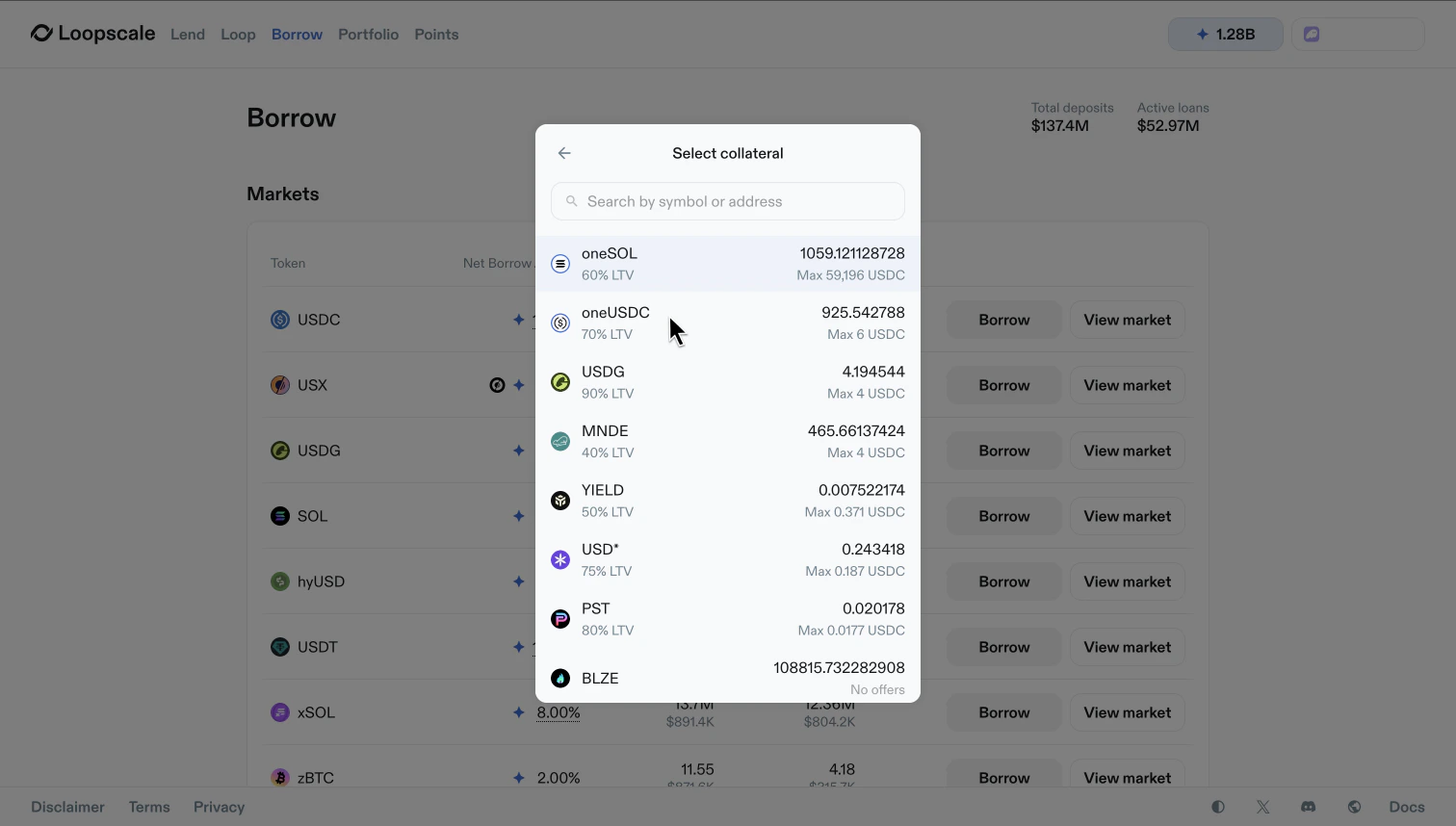
When you deposit into an eligible Loopscale Vault, your deposit or a portion of your deposit can be used as collateral to borrow USDC or SOL on Loopscale, no withdrawal required. The same deposit earns base lending yield and collateralizes a borrow on Loopscale. To use Vault Lending Position (Vault LP) tokens as collateral, navigate to the Borrow tab in the Loopscale App and select your Vault LP token as the collateral asset (oneUSDC, oneSOL).
Ss
When using Vault LP tokens as collateral, you will see your full LP balance (including collateral) on the Loopscale Vault page, but you will only be able to withdraw the amount not being used as collateral. Repay the borrow at any time to withdraw the remaining position. When Vault LP tokens are used as collateral, the corresponding position amount only earns base Vault lending yield and Loopscale points. Additional lending token rewards are not earned on the position amount being actively used as collateral. 
The following Vault Lending Positions are currently eligible to be used as collateral:
  • USDC Genesis
  • SOL Genesis
Additional eligible Vaults will be added over time.

Risk Management

Users should evaluate curator quality and vault strategy before depositing. Each Vault is also designed with built-in transparency and risk protections, including public parameters, time-locked changes, and limits on curator control. Curators cannot withdraw user deposits. Lending terms (APY, eligible durations) may be updated at any time but changes to collateral eligibility (including LTVs and liquidation LTVs). These safeguards help ensure depositors are never exposed to sudden or opaque shifts in strategy. The Loopscale Vaults primitive has been audited.
See Risks & Security for more information on risk management on Loopscale.

Choosing a Vault

Each Vault reflects a specific strategy and risk profile defined by its Curator. For example:
  • A conservative Vault may focus on liquid, low-volatility assets for stable returns
  • A higher-yield Vault may lend to borrowers with leveraged strategies or use riskier collateral types like LP tokens or LSTs
This flexibility allows users to select Vaults based on their own yield targets and risk tolerance.

Vaults vs. Advanced Lending

Users who want to set their own terms or manage risk more precisely can open Advanced Lending positions instead of depositing to Loopscale Vaults. Learn more about Advanced Lending.
FeatureVaultsAdvanced Lending
Capital managementCurator-managedUser-managed
Risk customizationPredefined strategyFully customizable
Return potentialModeratePotentially higher
UXSimple and passiveRequires active management
Suitable forMost usersPower users / active lenders